

The best writing tools!
Programs I use, and if you should use them too

There are a million different apps, websites, and programs out there to help you on your writing journey, and I have probably tried most of them (which I call productive procrastination).
I am currently working on my third novel, a Dual PoV Space Opera, and there are certain tools I can’t write without nowadays. Tools that have helped me overcome writing slumps, tackle procrastination, and get inspired.
Let’s dive in!
1. Scrivener
It’s popular, and in my humble opinion, for a reason.
I got Scrivener while I was editing my first novel, and it definitely changed my workflow for the better. For ages, I used to write with Microsoft Word, but it got annoying to have to scroll between chapters, to switch between one document with worldbuilding, and the other one with my writing.
In Scrivener, you can easily create and switch between chapters, character sheets, location sheets, and notes. All in one window! It also has great formatting tools for different modes of publication, be it an ebook or a paperback.
I transferred all of my writing to Scrivener, and I don’t see myself ever going back. Now, Scrivener’s layout can be overwhelming at first, and it has A LOT of tools, some of which I don’t use (yet), but I found it relatively easy to get into.
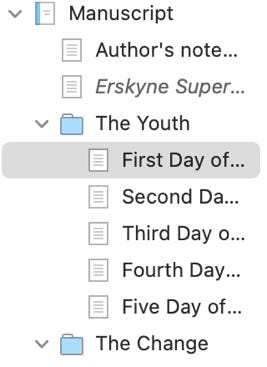
Scrivener costs £55 for the Standard and £46.75 for the Educational Licence, BUT you only pay once and have the program forever, contrary to a lot of subscription-based services. Personally, I saw it as an investment in my future as a writer. Being organised with my documents and my writing makes me more productive, which equals more writing, which equals a higher chance of producing something publishable.
If you are thinking about getting Scrivener and would like to support me at the same time, check out my affiliate link! There is no extra cost for you, and I appreciate the support: https://www.literatureandlatte.com/scrivener-affiliate.html?fpr=alexandra18.
A free alternative to Scrivener is Reedsy. However, I could not warm up to the interface or how everything was set up, but if you prefer to save money, I would definitely recommend it as a good free alternative.
2. Pinterest
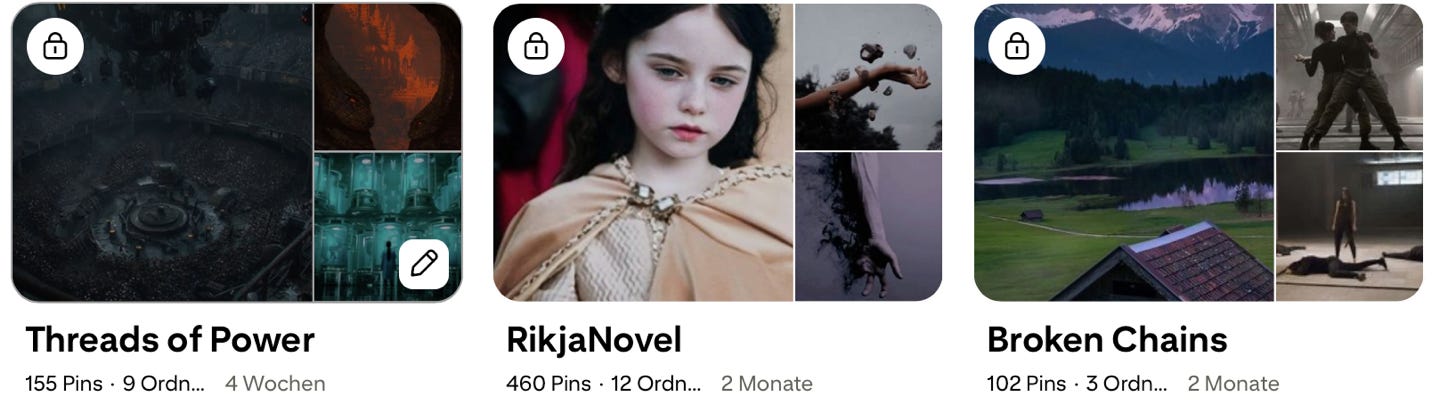
Pinterest, my precious ✨. I have used this platform for every single one of my projects so far, as I struggle with visualisation, and the pictures help me set the vibe of the novel. I started creating a Pinterest board for every novel, with subfolders for the different acts, characters, or planets.
That being said, like almost every other social media platform nowadays, Pinterest has been flooded with AI content. If you want to see less of this content, there is a neat workaround:
If you see an AI post (they have to be marked as AI, though some still aren’t), you can click on the three dots and select ‘see fewer AI entertainment Pins’.
Have a look through your settings. Go to ‘Refine your recommendations’, then to ‘GenAI interests’, and turn everything off.
Go to ‘Privacy & Data’ and turn off the ‘GenAI’ feature.
Doing these things made a huge difference in my Pinterest feed!
3. Spotify
I listen to music all the time when I write, as it helps me concentrate and boosts my creativity. My most listened to playlist last year was ‘Deep Focus’, which I wholeheartedly recommend!
Recently, I have started to create playlists for my novels, especially if there is a song that reminds me of a certain scene in my novel. In Rikja, my epic fantasy novel, there is a ballroom scene where my characters are having the time of their lives before everything goes to shit. Listening to ‘Summer Solstice’ by Taylor Ash helped me bring this scene to life by pouring all the joy I felt listening to this song into my writing.
For my current project, I listen to the ‘Atmospheric Sci-fi Soundtrack’-Playlist, and it has been amazing so far!
4. Microsoft Word
But Alexandra, didn’t you say you don’t use Word for your writing anymore? I did!
However, I still use it for editing. I could probably do something similar in Scrivener, but I really like to activate the ‘Track Changes’ feature when editing, because I can clearly see where I have edited and deleted things.
After going through my novel with that feature, I transfer everything into Scrivener, reading through it again in the process, and making changes where needed. So basically, two edits in one!
I also export my work from Scrivener to Word before sending it to beta readers, since most people have Word already and are familiar with its mechanics.
5. Inkarnate
If you write fantasy or just like to create your own worlds, Inkarnate is the program for you. It lets you create a file where you can freely draw your map, place little trees and houses on it, and give names to different areas. I used it for Rikja, and if I ever write high fantasy again, I will come back to it.
Inkarnate has a paid version with tons more features, but I personally think the free version is already pretty good. However, if you plan on creating a hundred different maps, the subscription is something you might want to look into, as the free version only lets you create three.
6. Substack
Last but not least, the platform we are on right now! Substack has been a great tool for me to stay motivated and connect with other writers. I found it especially rewarding when I shared my current struggle with query rejections, and had tons of people being supportive and sharing their own journey.
As we say in Germany: Geteiltes Leid ist halbes Leid. A sorrow shared is a sorrow halved!
I hope today’s post offers something new to you, whether it be a new writing program or a fresh way to get inspired.
A little update on my current writing:
I submitted my new adult dystopian science fantasy to beta readers last week, and already got my first comments! From now until the feedback deadline (learn why setting a deadline for beta readers matters here), I am working on a dual PoV space opera. I have a general idea of where I want the novel to go and have written around 6.000 words so far, but I have to figure out some things regarding the ‘packaging’ of the story.
Additionally, I have activated paid subscriptions today! I don’t plan on hiding any of my posts behind a paywall for the time being, but if you would like to support me anyways, feel free to do so. It’s much appreciated. <3
What are you currently working on? Let me know!
I've downloaded 'deep focus'.. Great post, thank you
Nice Post! It’s interesting how each author approaches the same problems differently.